![White_favicon.png]](https://help.rask.ai/hs-fs/hubfs/White_favicon.png?height=40&name=White_favicon.png)
You don't need to download a video to translate it. Paste a link to YouTube, Google Drive or Vimeo when you create a project, and Rask uploads the video for you.
How to translate a YouTube video by link
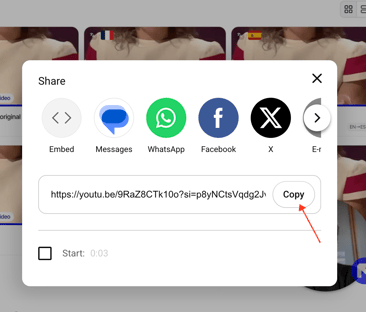
Copy the link to the YouTube video you would like to translate.
Click Translate Video and paste the link into the link field instead of uploading a file.
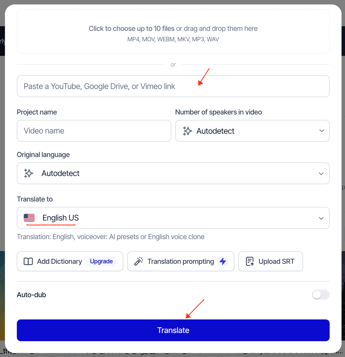
Select the target language and click Translate. Your video is uploaded to a new project, and you can dub it as usual. See the full dubbing guide.
Which links are supported?
- YouTube videos with public or link-only (unlisted) access
- Google Drive files shared with "Anyone with the link"
- Vimeo videos available to anyone with the link
The same upload requirements apply to videos added by link, including the maximum length of 5 hours.
What to do if the link upload fails?
Some links can't be downloaded automatically. The most common reasons:
- The video is private, age-restricted or available only in some countries.
- The video is a live stream or a premiere that hasn't finished yet.
- The Google Drive or Vimeo file isn't shared publicly.
To fix it:
- Check that the video opens in an incognito browser window without signing in.
- Try a link from another source, for example upload the video to Google Drive or Vimeo and share it.
- Download the video and upload the file directly from your device. This is the most reliable option.
If the upload still fails, contact us through the support chat or at support@rask.ai and include the link you tried.