![White_favicon.png]](https://help.rask.ai/hs-fs/hubfs/White_favicon.png?height=40&name=White_favicon.png)
Download any translated project
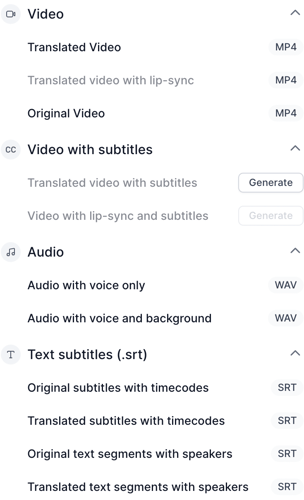
We offer several download options for the translated results to help you meet all your needs.
Download video variants:
-
Translated video (MP4)
-
Translated video with Lip-sync (available for projects translated with Lip-sync) (MP4)
- Original video (original format)
- Translated video subtitles (MP4)
- Translated video with Lip-sync and subtitles (MP4)
Audio
- Audio with voice only (WAV, 16b 44,1 kHZ)
- Audio with voice and background (WAV, 16b 44,1 kHZ)
Subtitle files in SRT format:
-
Original subtitles
-
Translated subtitles
-
Original timestamps with speakers
-
Translated timestamps with speakers
How to download several projects at once?
- Open your project list or a folder and select the finished projects you need.
- Click "Download" in the actions bar.
- Each project saves as a separate file in your browser's downloads.
- If your browser asks to allow multiple downloads, allow it for this site.
- Check that you received every file. Projects that are still processing or unavailable are skipped. Download them once they are ready.
Download problems
- The download doesn't start: allow pop-ups and multiple downloads for app.rask.ai, or try another browser.
- The video has no voiceover: make sure the project is dubbed and you chose "Translated video", not "Original video".
- The video has a watermark: videos created on the free trial include a watermark, see how to remove it.
Related: lip-sync, video with subtitles and adding Rask subtitles to YouTube and video editors.