![White_favicon.png]](https://help.rask.ai/hs-fs/hubfs/White_favicon.png?height=40&name=White_favicon.png)
How to cancel subscription
- To cancel your subscription, go to your RASK account settings
- Then, choose the "Cancel Subscription" option.
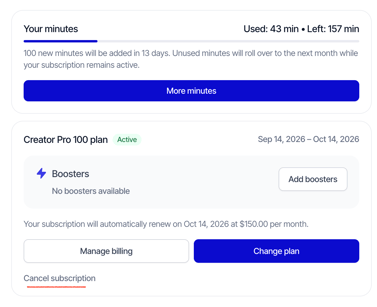
After canceling, your subscription will remain active until the end of your billing period. This allows you to keep using the app for the month you've already paid for.
Here’s what will happen after your subscription ends at the end of the billing cycle:
❗️ Any remaining minutes will automatically expire.
🔒 Your access to the service will be frozen. No uploading new videos and translating.
How to pause subscription?
- To cancel your subscription, go to your RASK account settings
- Then, choose the "Cancel Subscription" option.
- You will be proposed with the offer to pause the subscription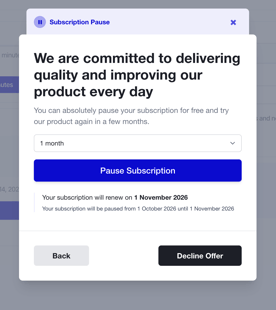 - Click on the Pause Subscription button.
Please note that you can choose to pause your subscription for 1 months once a year. The pause period cannot be extended, and subscription is renewed automatically when pause ends (unless cancelled).
Once you select pause:
- your subscription access is paused immediately;
- you can unpause manually at any time when you need to continue using Rask.
Billing date remains the same, and when unpaused, the payment for new billing period of your selected plan will be processed in full on the closest billing date.
If you have any questions, please contact us via the support chat or support@rask.ai.