![White_favicon.png]](https://help.rask.ai/hs-fs/hubfs/White_favicon.png?height=40&name=White_favicon.png)
The free trial lets you hear your own video in another language before you choose a plan. Rask dubs a fragment of up to 60 seconds with the same engine that paid plans use, so you can judge the real quality on your own content.
What the free trial includes
| Included | Details |
|---|---|
| 3 trial minutes | Added to your account when you register. |
| A dubbed fragment of up to 60 seconds | Rask picks the fragment where speech starts, so the sample contains the voice even when the video opens with music or titles. |
| Dubbing 2.0 | Meaning-first translation and the new voice model, for supported languages and voices. |
| Voice cloning | The speaker's voice in the target language, for languages that support cloning. |
| The editor | Read the transcript and the translation segment by segment. |
| Watermarked preview | Watch the dubbed fragment in the app. |
You can see your remaining trial minutes in the account.
What needs a plan
These features are part of paid plans:
- downloading the dubbed video or audio without a watermark;
- SRT upload and download;
- free changes to the text and free re-dubbing of segments using the transcript-editing workflow;
- lip-sync;
- on-screen text translation (Visual Translation);
- saved Custom Voice Clones in the voice library;
- API v3 and the MCP server.
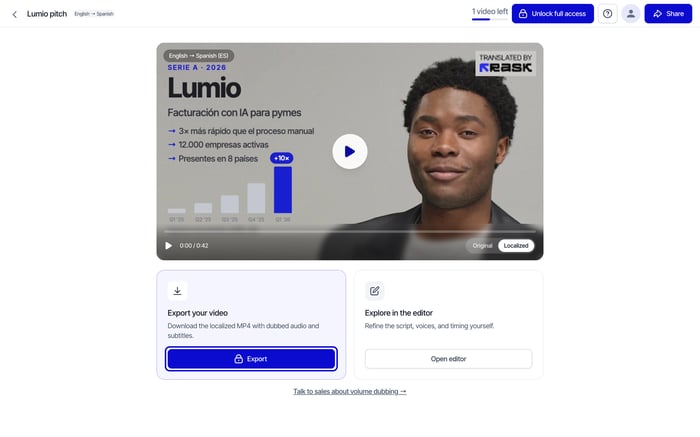
When you click Export, Unlock full access or See plans, Rask shows the plans that include these features.
How long the trial lasts
Trial minutes are added once, when you register, and they do not renew each month.
After you upgrade
A paid plan gives you the full length of your video, downloads without a watermark and all the features of your plan.
The trial fragment stays a fragment, because Rask does not reprocess it automatically. To translate the full video:
- Click Upgrade to translate the full video, or create a new project.
- Upload the full video again.
- Choose the language and start the dub, and Rask uses your plan minutes for the full length.
Which plan to choose
| You want to | Plan |
|---|---|
| Dub videos and download them, with voice cloning | Creator |
| Add lip-sync, SRT files and Custom Voice Clones | Creator Pro |
| Translate on-screen text and work as a team | Business |
| Security review, contracts, SLA and custom integrations | Enterprise |
Compare plans and prices · Plans and minutes explained
FAQ
Can I try lip-sync on the free trial?
Lip-sync is part of paid plans, so you can watch examples on the lip-sync page or choose Creator Pro to apply it to your videos.
Why can't I download my trial video?
The trial shows a watermarked preview in the app, while downloads are part of every paid plan.
Can I get more trial minutes?
Trial minutes are added once per account. For a larger project, for example 2,000 minutes or more for a team or a company, book a call with our team and ask for an extended trial. On Business and Enterprise, we also offer free onboarding with step-by-step guidance and tips from our team, so your translations turn out the way you need them.
Which languages can I try?
Every target language available for your project, which you can find in To which languages can I translate my video?